9/8/2026
Free E-Prescribing Software: What "Free" Actually Includes and How to Total the Real Cost
If you are a clinician looking for free e-prescribing software, here is the short version. Free tiers usually cover one thing well: sending non-controlled prescriptions electronically. The costs, when they exist, show up in four places: a monthly or annual license, a cap on prescription volume, a paid add-on for controlled substances (EPCS) with its own identity-proofing fee, and setup or contract terms. If you know those four places, you can compare any two tools in about ten minutes.
This guide explains what a free e-prescribing tool should include, where the paid parts hide, and how to total the real cost. It also shows publicly posted pricing from four standalone vendors, including eNavvi, as of September 2026.
What "free e-prescribing" usually means
The phrase covers three different things, and directory sites tend to mix them together.
A free tier inside an EHR. Some electronic health record (EHR) products have offered free or low-cost entry plans that include prescribing. You get prescribing, but you also take on the EHR: its data model, its contract, and its upgrade path. This makes sense if you want the EHR anyway. It is a poor fit if you already have one, or only need to prescribe.
A free trial of a paid product. Many standalone e-prescribing vendors offer 14 to 30 days free. This is a trial, not a free plan. Pricing after the trial is what you are actually evaluating.
A free core product with a paid controlled-substance tier. A smaller group of standalone tools make non-controlled prescribing free indefinitely and charge only for EPCS. eNavvi uses this model: standard e-prescribing is free, and EPCS is a paid subscription. This is the model most likely to match what a search for "free e-prescribing software" is really asking for, so it is worth understanding its boundaries.
The four places cost appears
Whatever the pricing model, the money shows up in one or more of these lines. Ask about all four before you register.
1. License or subscription
Standalone vendors typically price per prescriber per month, often billed annually. Check whether the published number requires an annual commitment and whether it is per prescriber or per practice. A "practice" plan is sometimes cheaper per seat but only if you have enough prescribers to fill it.
2. Volume caps and per-script fees
Some plans include a fixed number of prescriptions per month and move you to a higher tier above it. If your practice writes a high volume of refills or short-course scripts, a cap can matter more than the base price. Ask whether refills, cancellations, and change requests count against the cap.
3. EPCS and identity proofing
Electronic prescribing of controlled substances is almost never free, because the software must meet DEA requirements under 21 CFR Part 1311, including identity proofing of each prescriber and two-factor authentication at signing. Vendors recover that cost in different ways:
- A monthly EPCS subscription on top of a free or paid core.
- A separate annual identity-proofing or biometric fee per prescriber.
- A one-time verification fee at setup.
- Bundled into a higher per-license price that covers controlled and non-controlled prescribing together.
If you prescribe any Schedule II–V medication, this line is often the largest single cost in the comparison. See our companion piece on what EPCS requires and costs (proposed article; link once published) for the regulatory detail.
4. Setup, onboarding, and contract terms
Look for one-time account setup fees, network verification fees, minimum terms, and cancellation rules. Also ask how long activation takes. A tool that takes ten business days to verify your credentials is a real cost if you need to prescribe this week.
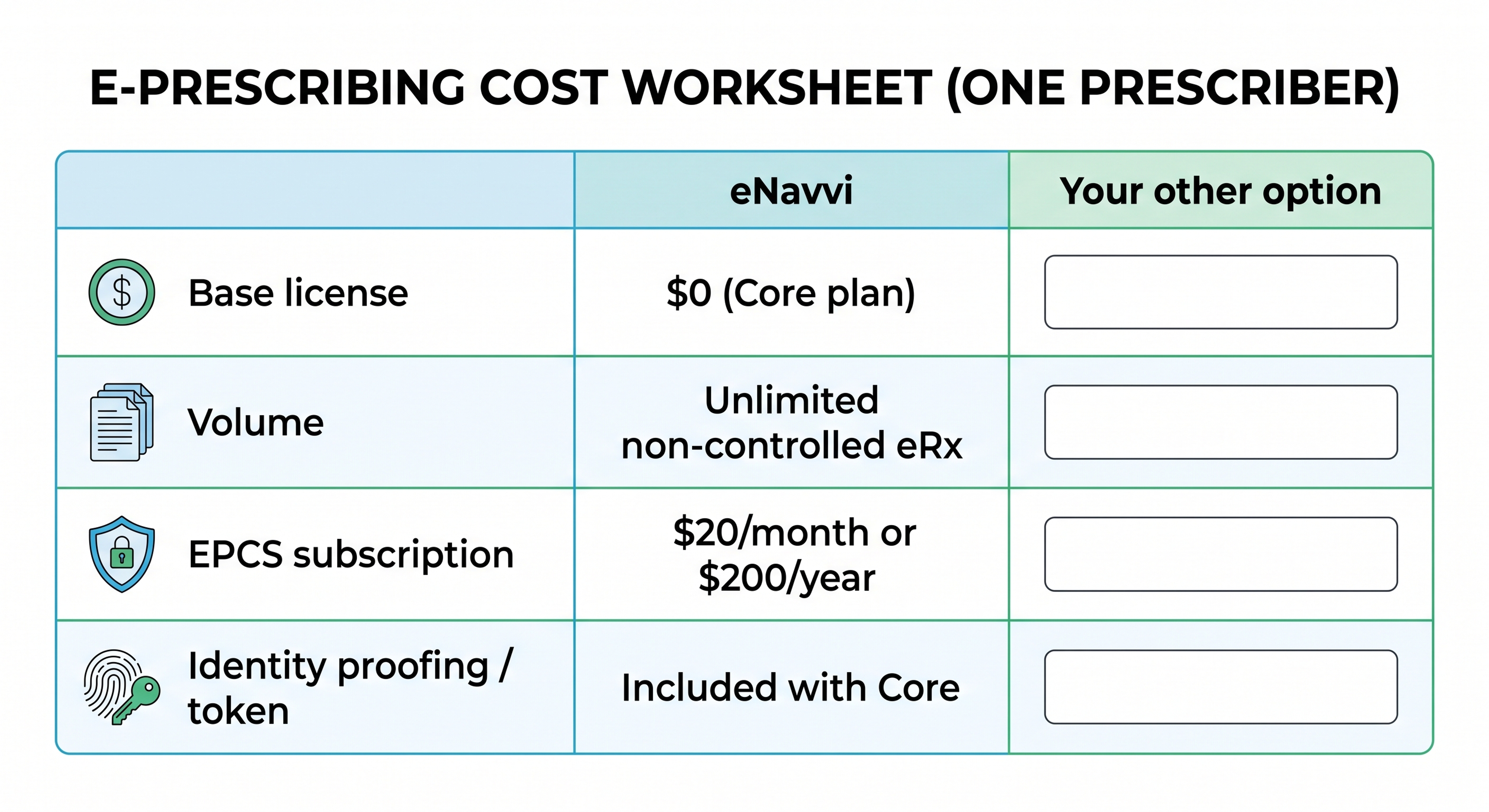
A total-cost worksheet
Use the same worksheet for every vendor you evaluate. Put a number or "$0" in each row, and write "unknown" where the vendor does not publish it. Unknowns are a finding in themselves.
Two practical notes. First, calculate the 12-month number for one prescriber, then for your actual headcount. Per-practice plans and annual-only billing change the ranking at different sizes. Second, price is only one column. Certification, network connectivity, and supported prescriber types belong in the same comparison and are covered below.
What free should still include
A free plan is not a good deal if it drops the things that make e-prescribing work. Whatever you pay, confirm these:
Surescripts connectivity or equivalent network access. Electronic transmission to pharmacies runs over the Surescripts network for most of the country. Ask whether the vendor is Surescripts-certified for standard e-prescribing and which transaction types are supported (new prescriptions, cancellations, refill requests, change requests).
A stated fallback when electronic delivery fails. Some vendors fail over to fax when a pharmacy cannot receive an electronic prescription. Others do not. Know which you are getting.
Coverage where you practice. Confirm the tool operates in your state and supports your credential type. Standalone tools vary in whether they accept NPs, PAs, dentists, podiatrists, optometrists, or pharmacists with prescriptive authority.
Security posture you can verify. Ask for the SOC 2 report or equivalent and, for EPCS, the DEA-required third-party audit or certification report. Under 21 CFR 1311.300, EPCS application providers must make that report available to practitioners who use or are considering the application.
Pricing you can read without a sales call. If the base price is not published, budget time to obtain it, and treat the missing number as a cost signal.
What a standalone e-prescribing tool does not do
Standalone prescribing tools are not EHRs. They generally do not chart visits, code and bill encounters, manage schedules, or store the longitudinal record. If you need those functions, you are shopping for an EHR, and the prescribing module comes with it.
A standalone tool also does not replace your judgment about drug interactions, formulary coverage, or prior authorization. Some standalone tools include interaction checking, formulary lookups, or real-time benefit data; others focus on transmission and price transparency. Ask which clinical decision-support features are included rather than assuming.
Where eNavvi fits
eNavvi is a standalone e-prescribing platform that works from a browser or mobile app, independent of any EHR. As of September 2026, its pricing page lists three plans:
- Core: free. Unlimited non-controlled e-prescribing, real-time pharmacy price comparison, and IAL2 identity verification, on desktop and mobile.
- EPCS: $20 per month or $200 per year per prescriber, after a one-month free trial, cancel anytime. Adds Drummond-certified electronic prescribing of Schedule II–V controlled substances with two-factor authentication. EPCS requires an active Core account and is currently desktop only.
- Enterprise: custom pricing for EHR integration, telemedicine enablement, dedicated onboarding, and support commitments.
According to eNavvi's FAQ, the platform operates in all 50 states and Washington, D.C.; currently supports MD, DO, DMD, DDS, DPM, NP, DNP, and PA prescribers; transmits over the Surescripts network with automatic fax failover; and is SOC 2 Type 2 certified. Credential verification typically takes about two hours during business hours.
Put into the worksheet above for a single prescriber who does not prescribe controlled substances, eNavvi's 12-month total is $0. For a prescriber who needs EPCS, it is $200 to $240 depending on billing cycle, with no separate identity-proofing fee listed.
Questions clinicians ask before registering
Is free e-prescribing software safe to use for patient prescriptions? Free pricing does not by itself say anything about safety or compliance. Judge the tool by its network certification, security attestations, and, for controlled substances, its DEA-required audit or certification report. Ask for documents rather than accepting a badge on a homepage.
Can I use a free standalone tool alongside my existing EHR? Usually yes, since standalone tools do not require EHR integration. The tradeoff is that prescriptions written in the standalone tool will not appear in the EHR's medication list automatically unless the vendor offers an integration. Decide whether you will document the prescription in the EHR manually.
Why is EPCS almost never free? DEA rules require identity proofing of each prescriber through an approved provider, two-factor authentication at signing, and periodic third-party audit or certification of the application. Those are recurring costs to the vendor, so they are typically passed through as a subscription, an annual fee, or a bundled higher price.
Does "unlimited prescriptions" ever have a catch? Sometimes the catch is not volume but scope: unlimited non-controlled prescriptions with controlled substances excluded, or unlimited on one platform (mobile) but not another. Read the plan boundaries, not just the word "unlimited."
Next step
If you want to run the worksheet against eNavvi's numbers, the pricing page lists the Core, EPCS, and Enterprise plans, and you can register for the free Core plan at enavvi.com. For questions about prescriber eligibility or state coverage, the FAQ is the fastest source, and the team can be reached through the contact page.
